Refining and Extending Your App
Last updated 7/08/2026
Overview
Once V has created your initial application, the application is ready for you to continue developing. Your requirements may change over time, new functionality may be needed, or you may simply want to adjust the way the application looks or behaves. V can continue to help you make these changes, allowing you to describe what you want in natural language and have V modify the existing application.
However, you are not locked into using V to maintain or develop your application. V is built on the Five low-code platform, which means that once your application has been created, you can continue developing it yourself using the visual development tools and other capabilities available in Five. You can therefore choose how you want to work with your application as it evolves.
Continuing to Develop with V
If you want to continue using V, you can ask it to refine the application you have already created. Rather than starting again, V can work with the existing application and make changes to its functionality, data structure, user interface, and other components.
For example, you might ask V to add a new feature, change the behaviour of an existing form, create a new report, add a business rule or modify an existing query. You can describe the outcome you want and V can make the required changes to the application.
This makes V particularly useful when you want to make larger or more complex changes without having to manually work through each part of the application yourself.
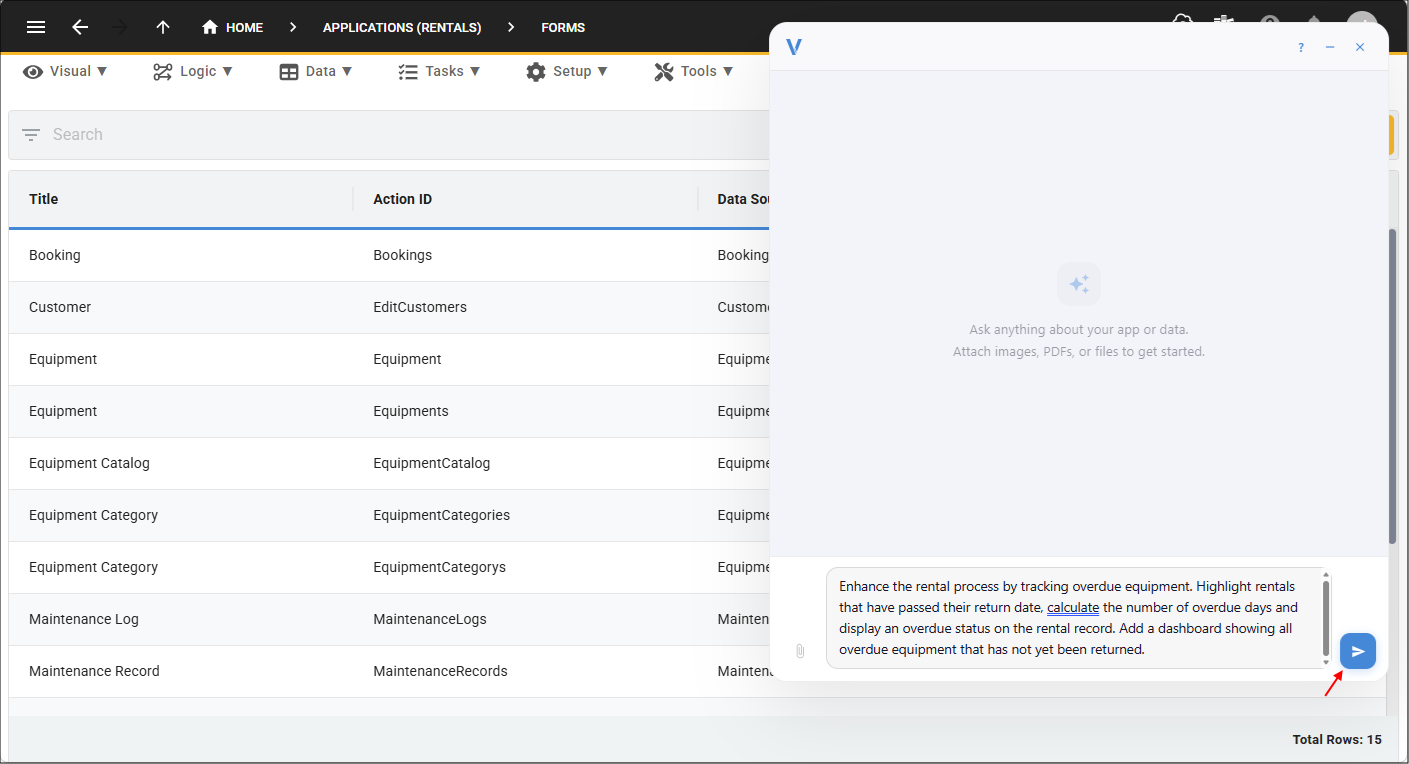
Lets say we are in a Rentals application, and we want to progressively enhance the application, we could use prompts like the following.
This demonstrates adding an entirely new feature.
This demonstrates V extending business logic.
This demonstrates improving reporting and user experience.
This demonstrates introducing automation.
Enter your prompt into V and click the Send button.
Making Changes Without V
You can also make changes directly within Five without using V. Because the application created by V is a Five application, you have access to the same low-code development environment used to build and extend applications in Five.
This means that common application changes can be made through Five's visual tools without requiring you to write code. For example, you can add fields to existing tables when your application needs to store additional information. Once the new table field has been added to the database, you can add it to the appropriate forms using the same method as adding the table field so that users can enter or view the information.
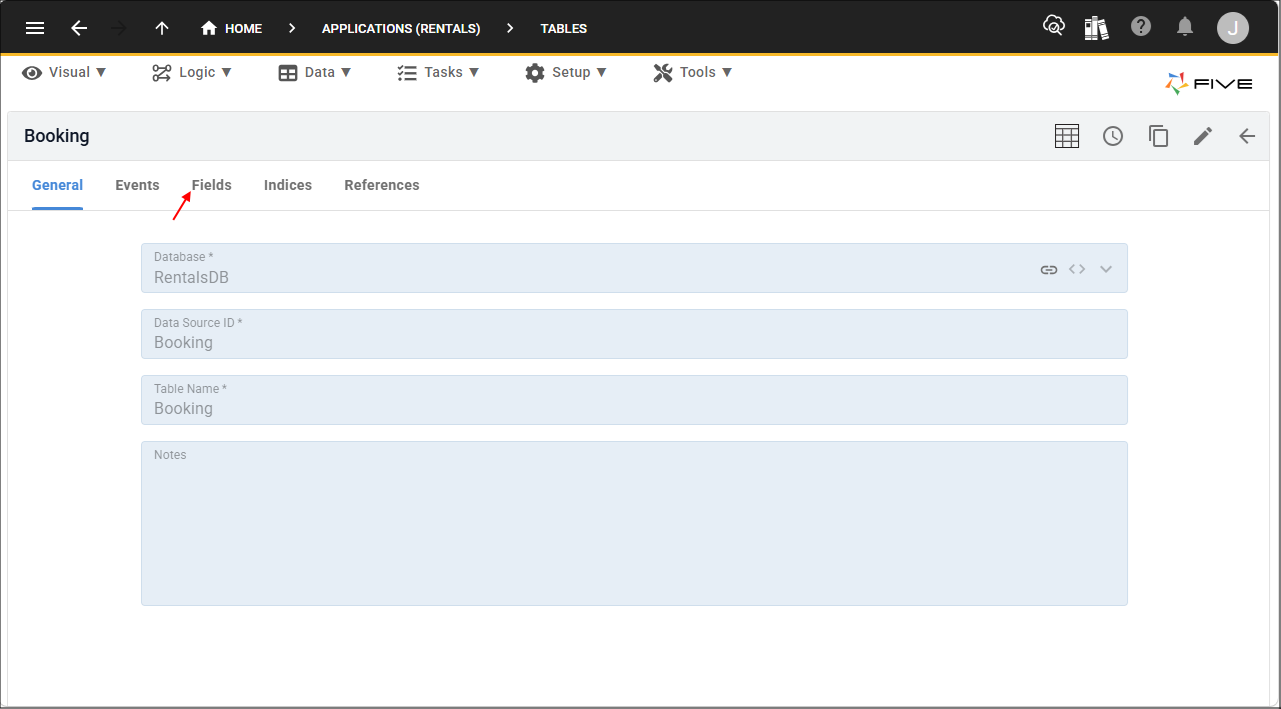
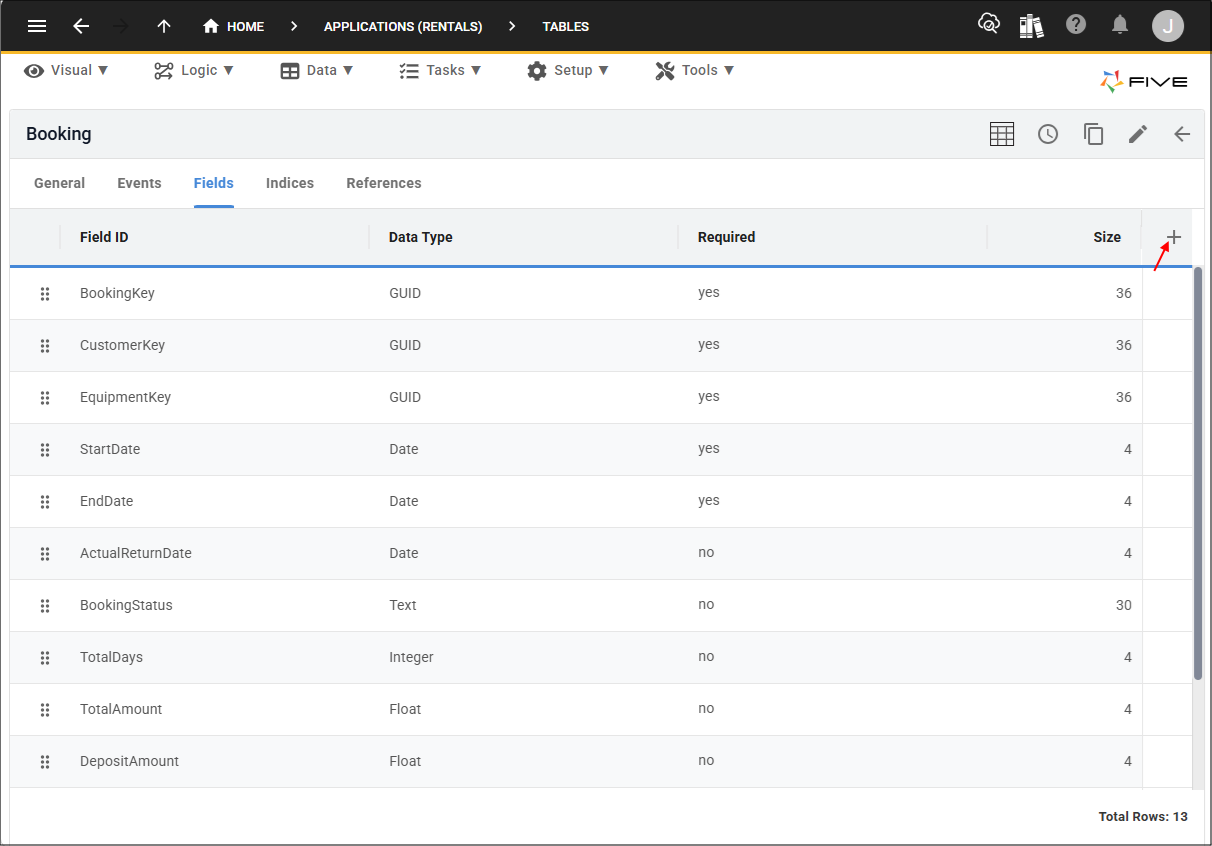
On the table record, click the Fields tab followed by the Add Fields button.
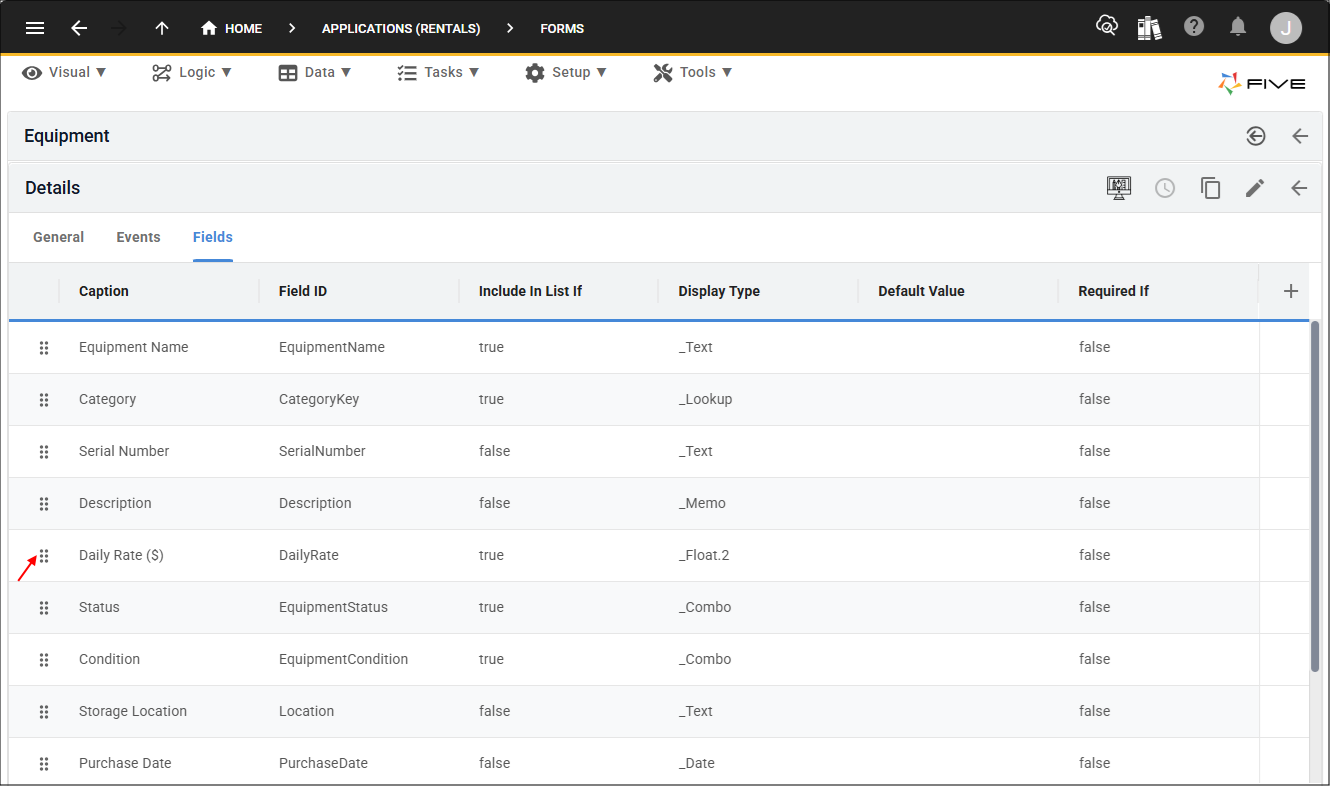
You can also change the way information is presented to users by rearranging fields on a form. Fields can be reordered to create a more logical workflow or to make frequently used information easier to access.
Left-click on the handle for the field, hold and drag the field to the required position.
These types of changes can be made directly through Five's interface, allowing you to progressively refine an application without needing to ask V to make every change.
Using Five's Low-Code Tools and Wizards
Five provides a range of visual development tools and wizards that make it quick to extend an application. Instead of manually creating every component, you can use point-and-click interfaces to configure and add functionality to your application.
For example, Five provides wizards for creating tables, forms, charts, and reports. The wizard guides you through the relevant configuration with minimal steps and creates the required component for you. This allows you to build additional functionality using a visual development approach rather than writing the underlying code yourself.
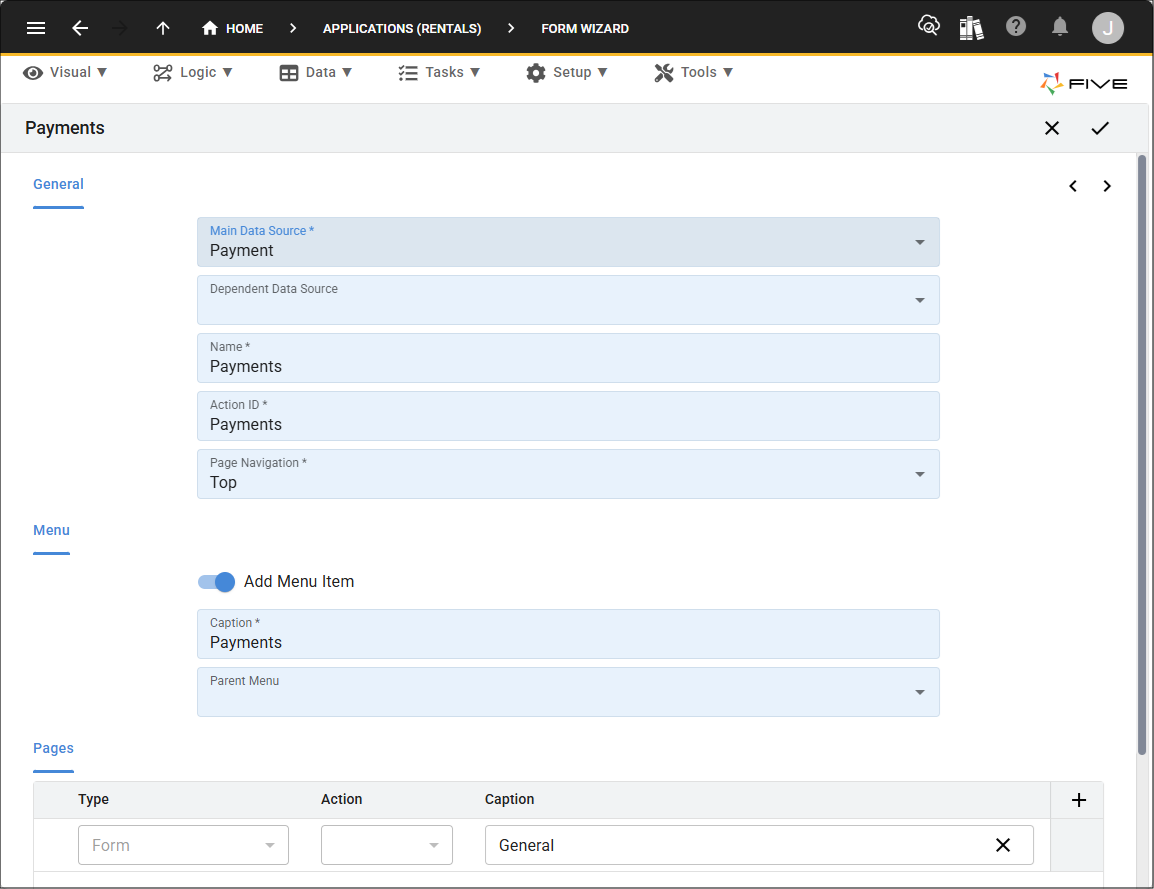
The same approach can be used when modifying existing components. You can open the relevant component in Five, make the required changes and save them as part of your application.
This is particularly useful for straightforward changes where it may be faster to make the adjustment yourself rather than asking V to implement it. Adding a field, changing the order of fields on a form or creating a simple report are examples of changes that can often be completed quickly using Five's low-code tools.
Finding Functionality in Your Application
As your application grows, it can contain many tables, forms, queries, functions, reports, and other components. Finding the specific functionality you want to modify can therefore become increasingly important.
Five provides a dedicated Tools menu to make this easier. The Tools menu is designed to help you quickly locate functionality within your application and access the area of Five where that functionality can be viewed or modified.
Rather than having to search through the application manually, you can use the Tools menu to quickly find the type of functionality you are looking for. This is particularly useful when working with an application that has been created or expanded using V, as the application can grow rapidly as new features and components are added.
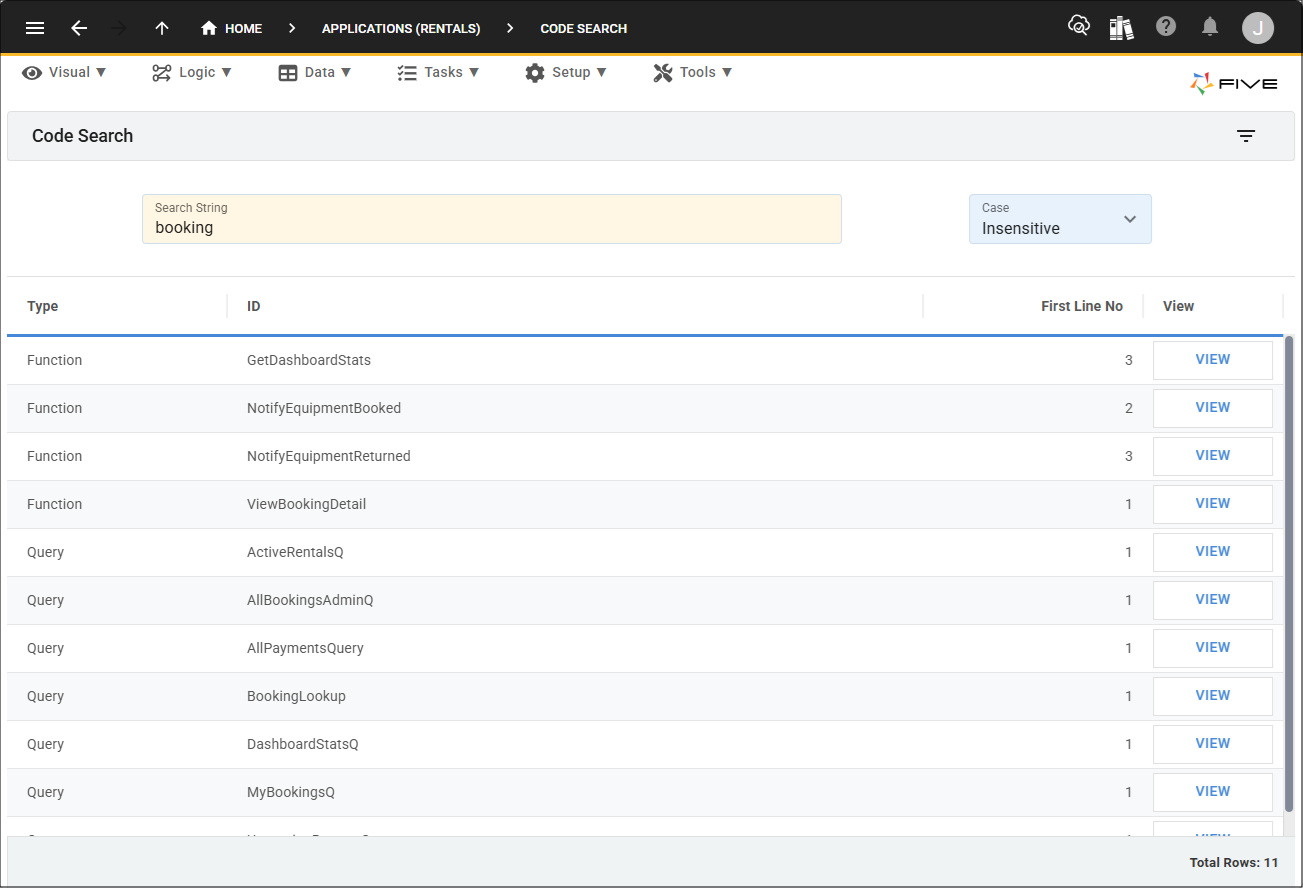
The Tools menu provides a convenient way to move from the application you are working with to the underlying functionality that makes it work. For example, when you need to locate a particular table, form, query, function or other component, the Tools menu can help you get to the relevant development area quickly.
This makes it easier to take ownership of an application after V has created it. You can use V to build functionality quickly and then use Five's Tools menu and development environment to locate, review, and modify that functionality yourself.
You Are Not Locked Into One Development Approach
One of the key benefits of combining V with Five is that you do not have to choose between AI-assisted development and low-code development. You can use whichever approach is most appropriate for the task in front of you.
You might use V to create the initial application, then make simple changes yourself using Five's visual tools. Later, you might return to V to add a more complex feature. You can then continue making other changes yourself within Five.
Changes made directly in Five become part of the same application that V works with. This allows you to move between V and Five as your development needs change.
If you can clearly describe the functionality you want, V may be the quickest way to implement it. If the change is a simple configuration task, such as adding a field, rearranging a form or creating a report, you may find it quicker to make the change directly in Five. For more advanced requirements, you can also combine both approaches, using Five's visual tools for configuration and V for more complex development work.
Viewing and Editing V-Generated Code
Although you do not need to work with code to make many application changes, the underlying code generated by V is available within Five.
Every part of the application generated by V is stored within Five, where it can be reviewed and, where appropriate, edited. This provides an additional level of control for users who want to understand or customize how their application works. V will store the code that it generates for your charts, dashboards, etc, in the Modules view.
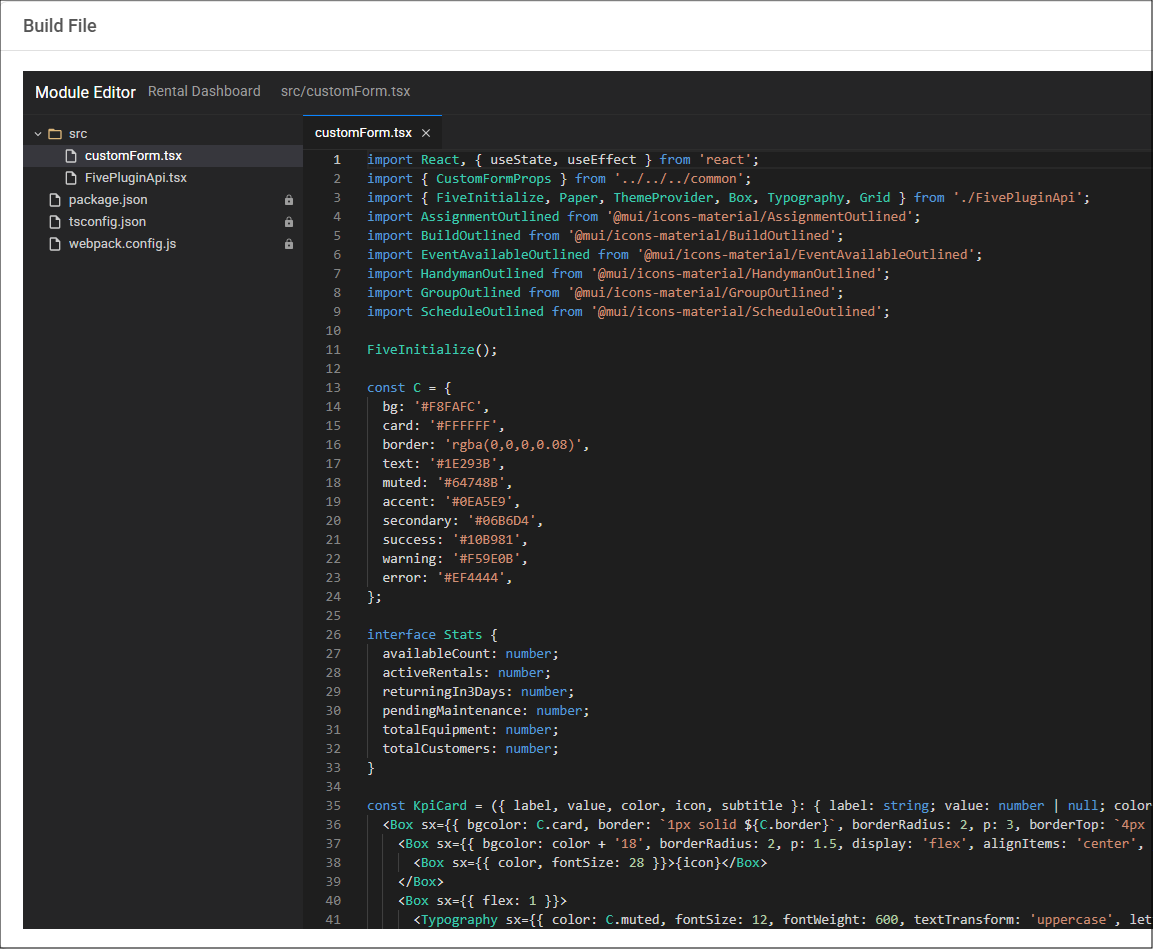
You can open the relevant code and review how a particular function or feature has been implemented. If you are comfortable working with code, you can make changes directly. Alternatively, you can ask V to modify a specific function or piece of code for you.
The availability of the underlying code does not mean that you need to understand or edit code to maintain your application. Five's low-code tools and wizards allow many common application changes to be completed through the user interface. Code is available as an additional level of control when you need it.
Working with Functions and Queries
As your application becomes more advanced, you may need to make changes to the functions and queries that control how it operates.
Functions generated by V can be opened and reviewed within Five. You can inspect how a function works, make changes directly if you are comfortable with the code, or ask V to modify the function based on your requirements.
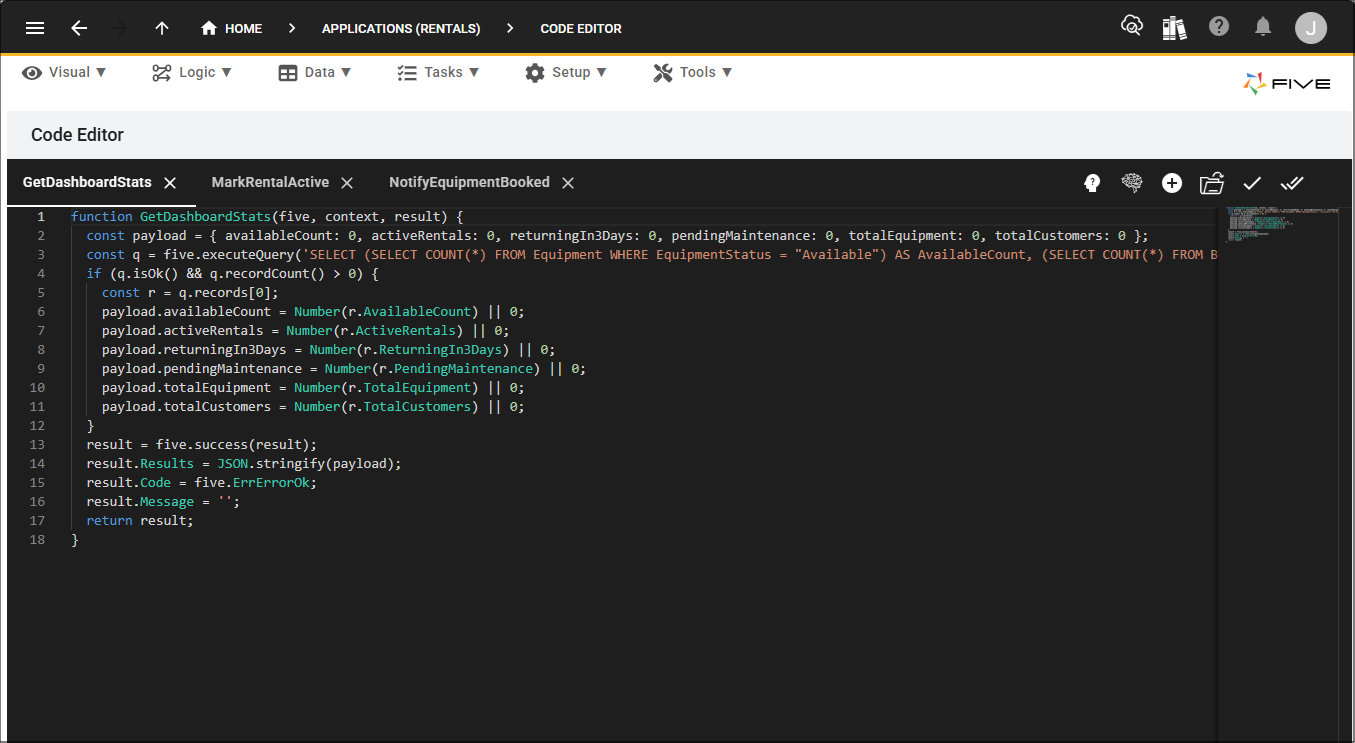
Queries can be managed in a similar way. You can review existing queries and make changes using Five's query tools, or use V when you want assistance creating or modifying a query.
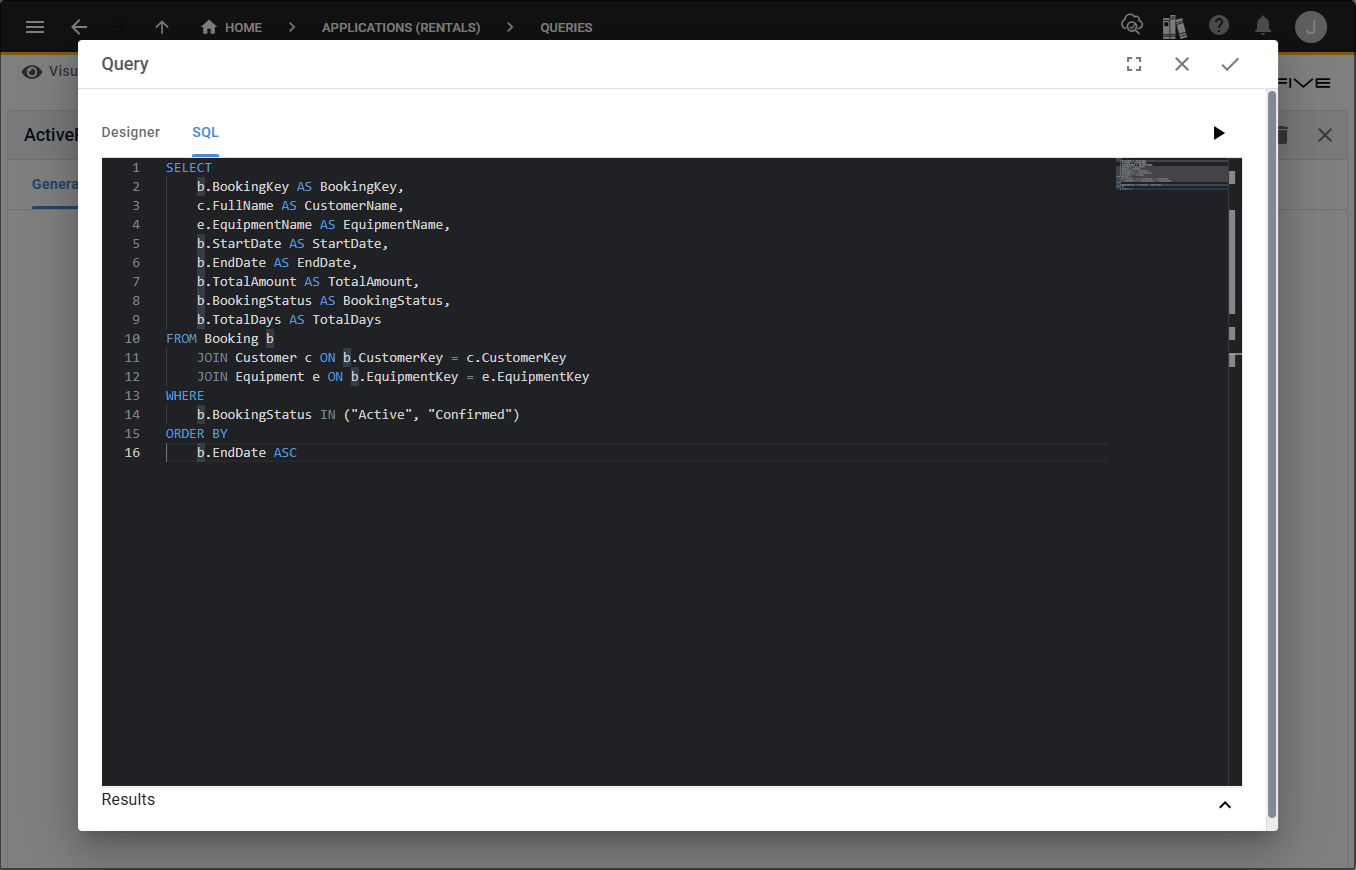
This gives you flexibility over how much control you want to take over the application's underlying implementation. You can leave V to handle the development, make changes yourself through Five, or use a combination of both.
Understanding Your Application's Database
As you continue developing an application, it is useful to understand how its data is structured. The Database Modeler provides a visual representation of the application's database, allowing you to see the tables that make up the application and the relationships between them.
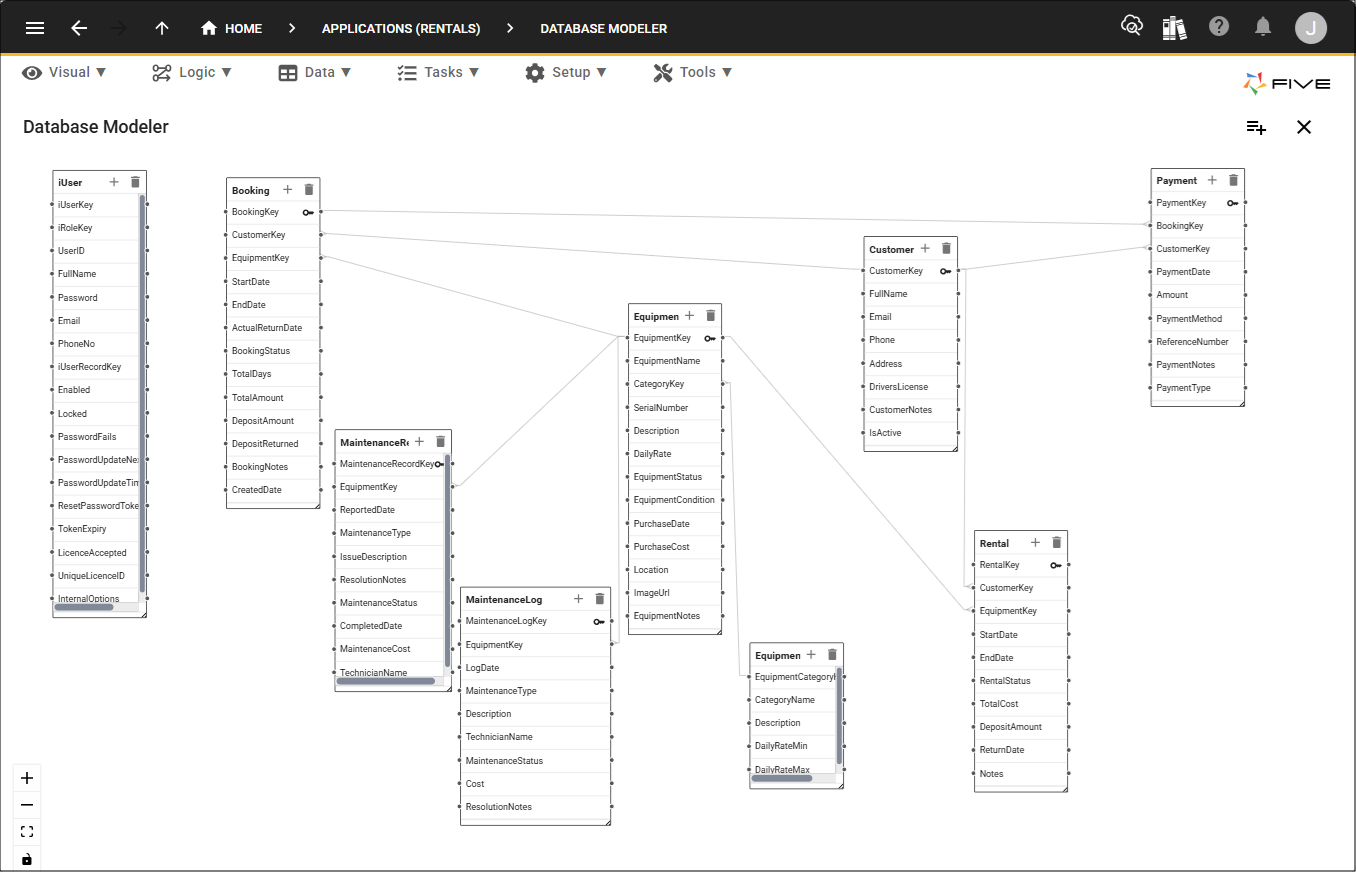
The Database Modeler can be particularly useful when working with an application that was initially created by V. As the application grows, you can use the model to understand how different tables are connected and how the application's data is organised.
This also makes it easier to make informed changes to the database. For example, before adding a new field or table, you can review the existing database structure to understand where the new information belongs and how it may relate to existing data.
Exploring an Application Created by V
An application created by V is not a closed or fixed application. Once it has been generated, you can explore its different components within Five and continue developing them as your requirements evolve.
You can inspect the application's database structure, tables, forms, queries, functions, and other components. The Tools menu provides a convenient starting point for locating this functionality, while the individual development tools allow you to inspect and modify the components themselves.
This allows you to understand how the application has been constructed and gives you the information needed to continue developing it yourself.
This is particularly useful if you initially use V to rapidly create an application and then want to gradually take more control over its development. You can start with a simple prompt, allow V to create the initial application, and then use Five's development environment to learn about and refine what has been created.
Choosing How You Develop Your Application
The approach you use will depend on the type of change you want to make and how much control you want over the implementation.
For simple changes, you may find it quickest to use Five's point-and-click tools. Adding a field, changing the layout of a form, or creating a report can often be completed quickly without involving V.
For larger or more complex requirements, V can provide a faster way to implement the change. Instead of manually creating each component, you can describe what you want and allow V to make the required changes.
If you need complete control over a particular part of the application, you can use the Tools menu to locate the relevant functionality, review the underlying configuration or code, and make changes directly. You can also ask V to modify a specific function or query while continuing to use Five's visual tools for the rest of the application.
There is therefore no requirement to use a single development approach throughout the life of an application. You can use V when it provides the greatest benefit and use Five's low-code and development tools whenever you want to make changes yourself.
V Gets You Started, Five Gives You Control
V provides a fast way to turn an idea into a working application and can continue to help you develop that application as your requirements change. However, the application remains fully available within Five for you to develop and customize yourself.
You are not dependent on V to make every future change. You can add tables and fields, modify forms, create reports, configure application components and use Five's other low-code tools without needing to use V tokens for each change. When you need more advanced control, you can also review and edit the underlying code.
At the same time, V remains available whenever you want AI assistance with development. You can ask V to implement new functionality, modify existing features, work with functions and queries, or help you make more complex changes.
The Tools menu makes it easy to locate the functionality within your application, while Five's development environment gives you the tools to inspect and modify it. The Database Modeler helps you understand the structure of your application's data, and the underlying code remains available when you need a deeper level of control.
This gives you the flexibility to develop your application in the way that best suits your needs. You can continue using V to rapidly build and refine functionality, develop the application yourself using Five's low-code tools, work directly with the underlying code when required, or combine all three approaches. V gets you started quickly, but Five gives you complete control over where your application goes next.